Open and close a shift
Start the day with a float and end it with a counted drawer and a Z-report.
A shift is one cashier's day on one register. It starts with the cash in the drawer and ends with the drawer counted.
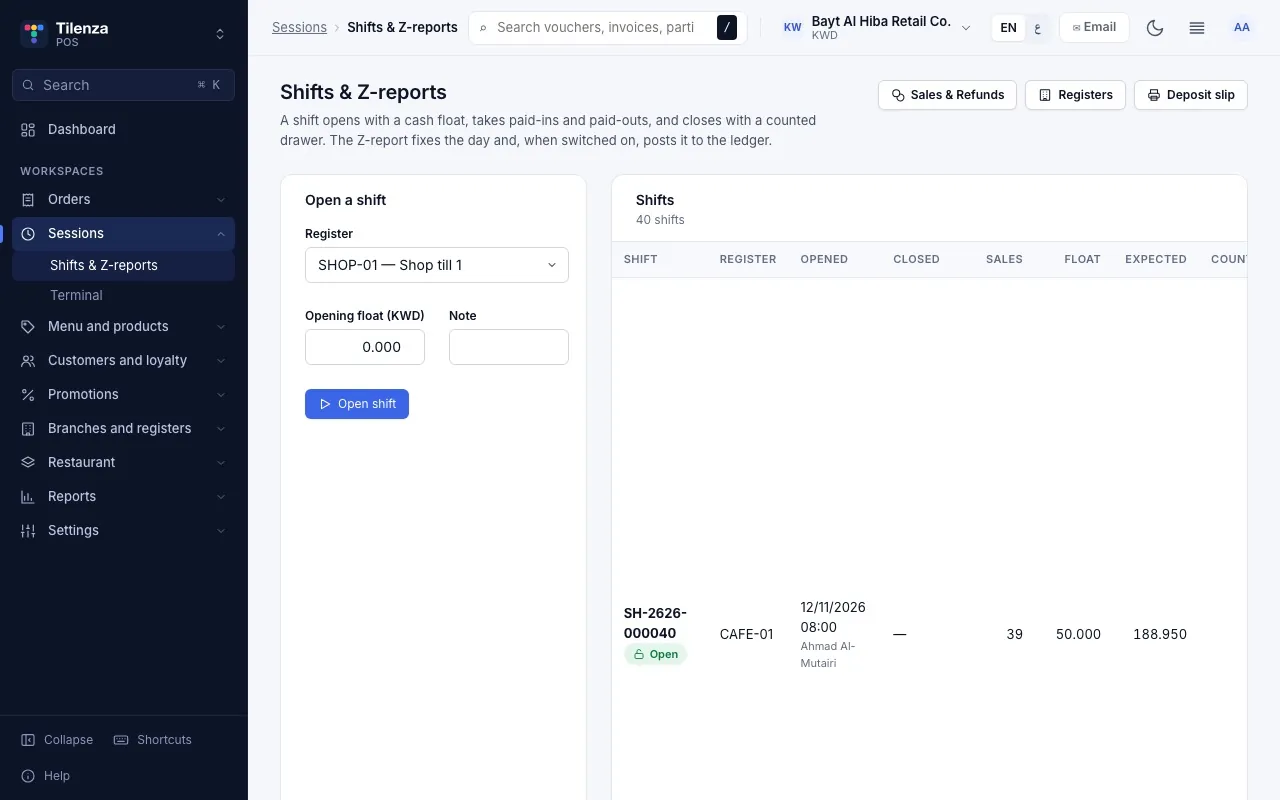
Open a shift
- Open Sessions › Shifts & Z-reports.
- Choose the register, type the opening float (the cash put in the drawer to give change) and press Open shift.
The till also asks for the float when a cashier signs in and no shift is open on that register.
During the shift
- Paid in and paid out record cash that goes into or out of the drawer for a reason other than a sale.
- With cash management switched on: an X-report shows the figures so far, a safe drop moves cash from the drawer to the safe, and Move a float sends cash to another open till.
Close the shift
- Count the drawer. With cash management on, count by note and coin and the till adds it up.
- Type the counted amount and close. The Z-report shows expected cash, counted cash and the difference.
- Print the Z-report. With posting to the ledger switched on, the shift's sales, payments and cash difference are posted to Finance as one journal.
A shift left open for more than 24 hours is marked on the dashboard under Shifts open.
Deposit slip at the top of the screen prints the cash to take to the bank.
Didn’t find what you need? Ask a person