Delivery dispatch and phone orders
Take orders by phone, give each delivery to a driver, follow it to the door and count the cash each driver hands in.
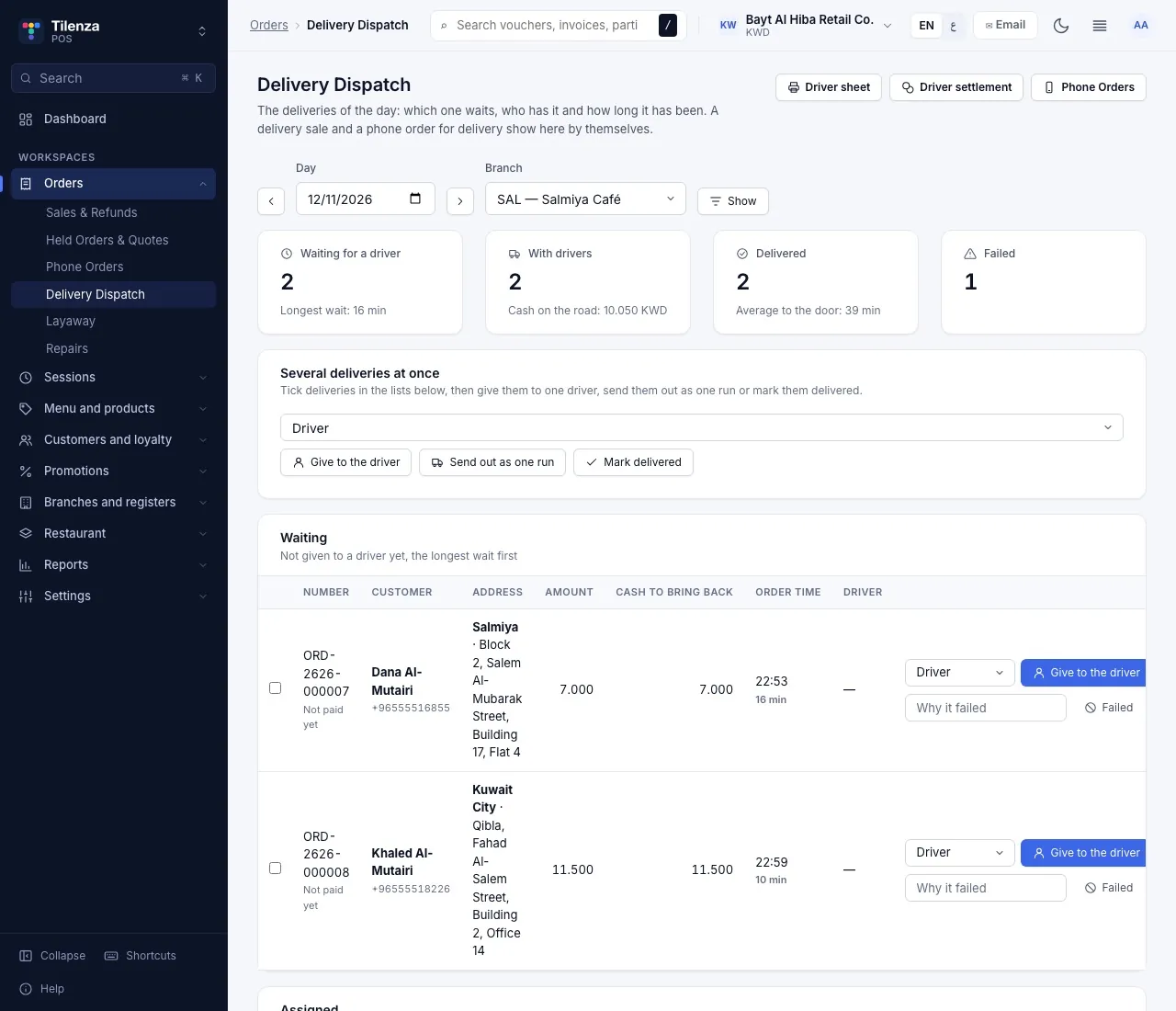
Delivery Dispatch shows the deliveries of the day: which one waits for a driver, who has each one, how long it has been and the cash each driver brings back. Phone Orders is the desk where staff take an order by phone for delivery or pickup.
Switch it on
Open Settings › POS Settings and find the Delivery card.
- Delivery dispatch with drivers needs The till takes delivery orders. Switching delivery off switches dispatch off too; the records are kept.
- Drivers collect cash on delivery makes the board count the cash each driver must bring back.
- Phone-order desk can be used without delivery, for orders that are collected. It also switches on holding sales on the server.
Delivery Dispatch and Phone Orders then appear under Orders.
Mark the drivers
Open Cashiers & PINs, tick Driver for each member of the till staff who delivers, and save. A driver who is limited to some branches is offered only for deliveries of those branches.
Take an order by phone
- Open Phone Orders and choose the register of the branch that will prepare the order.
- Type the caller's number and press Find. The screen shows the customer on file and the addresses used with that number before. Press an address to use it again.
- Type the name, choose Delivery or Pickup, and for a delivery the area and the address.
- Type a quantity next to each item, with a note where the customer asked for something.
- Press Price the order to see the total with the delivery fee and the tax, and tell the customer.
- Press Save the order.
The order waits at the till as a held order. A number that is not on file yet is added as a customer when the customer file is on. Pressing Save twice makes one order.
Pay it at the till
The cashier opens the held orders on the till and recalls the phone order. The items, the name and the phone come back, and the label of the order says Delivery or Pickup with the area and the start of the address. For a delivery the cashier chooses Delivery, the area and the address, as for any delivery sale, then takes the payment.
Where drivers collect cash on delivery, the order can stay held until the driver is back with the cash.
Follow the deliveries
Open Delivery Dispatch and choose the day, and the branch if you have several. A delivery sale from the till and a phone order for delivery appear here by themselves.
- Waiting: choose a driver and press Give to the driver.
- Assigned: press Send out when the driver leaves. Take off the driver puts it back in Waiting.
- Out for delivery: press Delivered when it reaches the customer.
- Failed: type why and press Failed. Try again puts a failed delivery back in Waiting.
Each row shows the minutes since the order. The tiles show the longest wait and the average time to the door.
To send several deliveries with one driver, tick them, choose the driver and press Give to the driver, then tick them again and press Send out as one run. They share a run number.
Driver sheet prints the deliveries a driver carries, with addresses, phones, amounts and the cash to collect.
Settle with a driver
Open Driver settlement from Delivery Dispatch. Each driver of the day has a row: deliveries made, failed, still with the driver, and the cash to hand in. Type what the driver handed in and press Record the settlement. The screen shows whether it is short or over. A driver with a delivery still out cannot be settled yet.
The settlement is a record only. It posts nothing to the shift, the cash drawer or Finance. Put the cash into the drawer the way the shop already does.
The report
Reports › Deliveries by driver and area shows, for any dates, the deliveries made and failed and the average minutes from the order to the door, for each driver and each area.
Didn’t find what you need? Ask a person