Receipts, refunds and voids
Find any receipt again, reprint it, refund it or void it with a supervisor.
Every receipt is kept. A sale is never deleted: it is voided while its shift is open, or refunded afterwards.
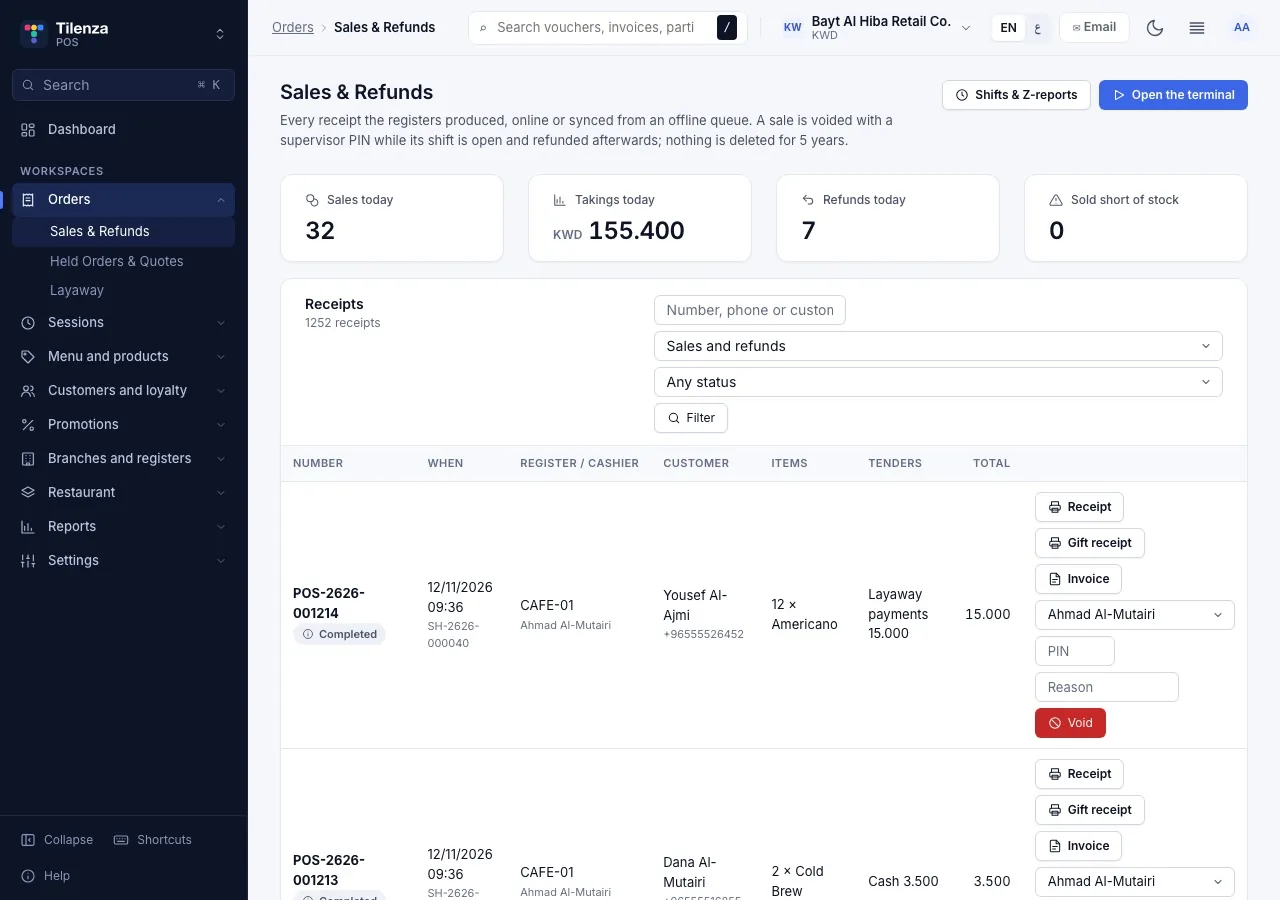
Find a receipt
Open Orders › Sales & Refunds. Search by receipt number, the customer's phone or name, and filter by sales or refunds and by status.
Print it again
Each receipt has three buttons: Receipt (the same slip again, marked as a copy when that is switched on), Gift receipt (no prices) and Invoice (a full page with the buyer's name, address and tax number).
Refund
On the till, open the menu and choose Refund, type the receipt number and choose the lines and quantities coming back. Choose a reason. The money goes back the way the settings allow: cash, the original method or store credit. Stock returns to the warehouse.
A refund without a receipt needs a supervisor's PIN and a named customer.
Void
A sale made by mistake is voided while its shift is still open: choose the supervisor, type the PIN and the reason, and press Void. The receipt stays on the list, marked as voided.
Exchange
On the till, an exchange takes items back and sells others in one step; the customer pays or receives only the difference.
Didn’t find what you need? Ask a person