Connect other systems: the API and webhooks
Tokens for other systems to read sales, shifts, customers and items, and webhooks that tell them when something happens.
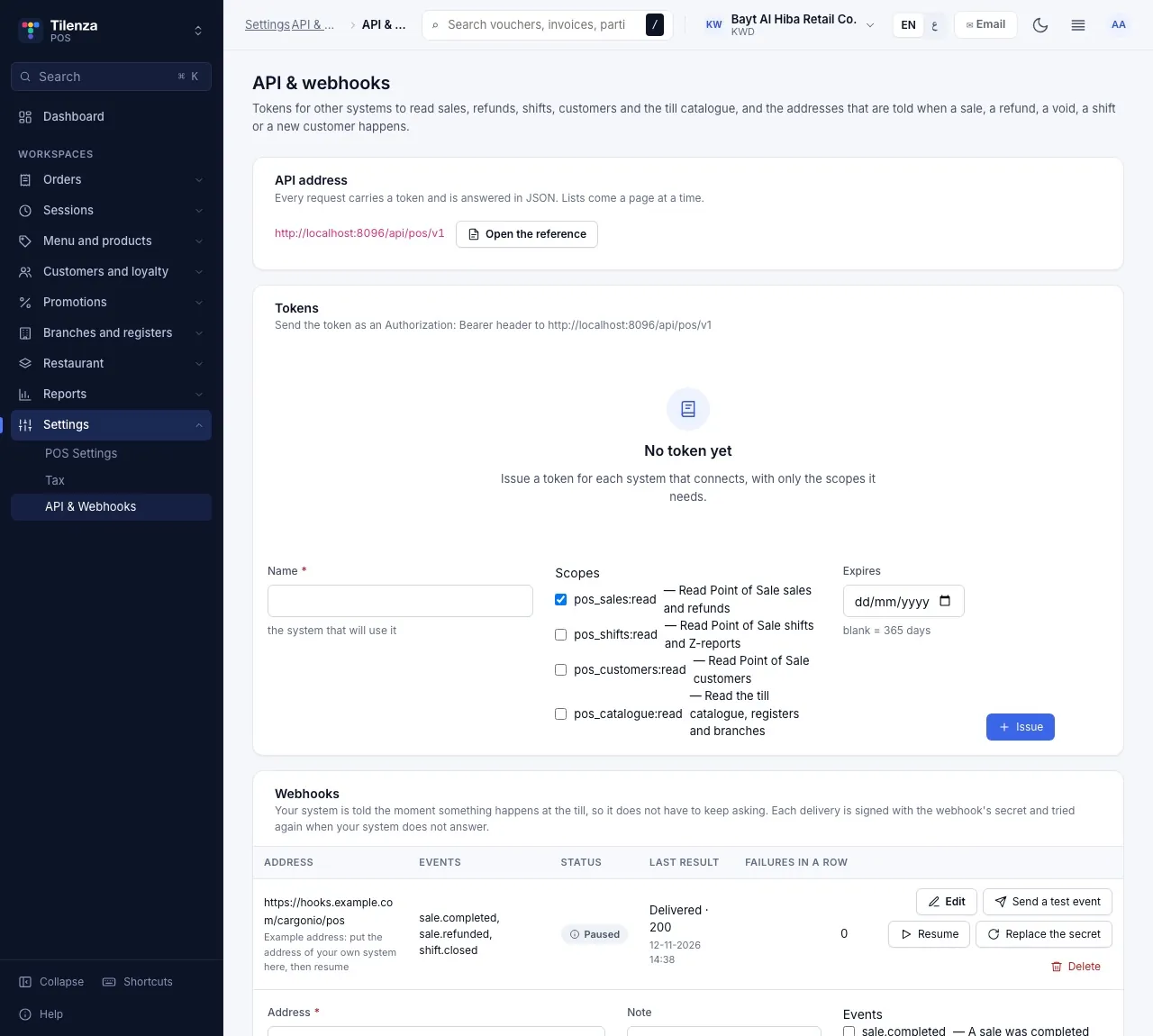
Another system can read what the tills sold and can be told the moment something happens: your accounts, a reporting tool, a loyalty or delivery service. Nothing can be read without a token, and nothing is sent without a webhook.
Switch it on
Open POS Settings, tick API and webhooks: other systems read sales and are told when something happens and save. API & webhooks then appears under Settings: open API & webhooks.
While the switch is off every address below answers 404 and nothing is sent. Tokens and webhooks are kept.
Tokens
Issue one token for each system that connects, under Tokens: a name, the scopes it needs and, if you wish, an expiry date. The token is shown once; copy it then. Revoke a token to stop it at once.
| Scope | What it reads |
|---|---|
pos_sales:read |
Sales and refunds |
pos_shifts:read |
Shifts and Z-reports |
pos_customers:read |
Customers |
pos_catalogue:read |
The till catalogue, registers and branches |
You can give a token only the scopes whose screens you may open yourself.
Calling the API
The address is on the screen and ends in /api/pos/v1. Send the token with every request:
GET /api/pos/v1/sales?from=2027-01-01&to=2027-01-31
Authorization: Bearer 12|cgf_…
Accept: application/json
Every answer is JSON with three parts: data, meta and errors. Amounts and quantities are text with the decimals of your currency ("12.500"), times are ISO 8601, and a value that is not there is null.
Lists come a page at a time, newest first. per_page sets the size (20 unless you say otherwise, 100 at most). meta.next holds the cursor of the next page: send it back as cursor. When meta.next is null you have everything. sort and dir=asc or dir=desc change the order.
A token may make 120 requests a minute. Past that the answer is 429 with a Retry-After header. Other answers: 401 for a missing, wrong, expired or revoked token, 403 when the token lacks the scope, 404 for something that is not in your workspace, 422 for a filter that cannot be read.
Addresses
| Address | Scope | Filters |
|---|---|---|
GET /sales |
pos_sales:read |
from, to (business day), register, branch, cashier, status (completed or voided), updated_since; include=lines adds the lines and tenders |
GET /sales/{id} |
pos_sales:read |
One sale or refund with its lines and tenders |
GET /refunds |
pos_sales:read |
The same filters as sales |
GET /shifts |
pos_shifts:read |
from, to (day opened), register, branch, status (open or closed), updated_since |
GET /shifts/{id} |
pos_shifts:read |
One shift with its Z-report |
GET /customers |
pos_customers:read |
phone, q, updated_since |
GET /customers/{id} |
pos_customers:read |
One customer |
GET /catalogue |
pos_catalogue:read |
branch (prices of that branch), category, q, updated_since |
GET /registers |
pos_catalogue:read |
|
GET /branches |
pos_catalogue:read |
register, branch and cashier take the id that the registers, branches and sales give. updated_since takes a date and time such as 2027-01-31T09:00:00Z; to copy only what changed, ask with updated_since, sort=updated_at and dir=asc.
Fields
Sale and refund: id, number, kind (sale or refund), status, refund_of_sale_id, shift_id, register_id, register, branch_id, cashier_id, cashier, customer (id, name, phone), currency, subtotal, discount_total, tax_total, service_charge, delivery_fee, tip_total, grand_total, tendered_total, change_due, coupon, service, tax_exempt_ref, sold_at, business_date, voided_at, void_reason, created_at, updated_at.
Line: id, item_id, sku, name, name_ar, kind, quantity, unit_price, discount, tax_rate, tax_inclusive, tax_amount, line_total, refunded_quantity, refund_of_line_id. Tender: method, amount, tip, reference.
Shift: id, number, status, register_id, register, branch_id, opened_at, closed_at, opened_by, closed_by, opening_float, expected_cash, counted_cash, cash_variance, updated_at, and z_report on one shift (empty while the shift is open).
Customer: id, name, name_ar, phone, email, locale, birthday, marketing_opt_in, source, wallet_balance, points_balance, loyalty_tier, allow_on_account, credit_limit, account_balance, tax_number, tax_exempt, tax_exempt_ref, tax_exempt_until, created_at, updated_at. The identity number and the notes are never given.
Catalogue item: id, sku, name, name_ar, category, unit, unit_price, currency, tax_rate, tax_inclusive, price_source, is_bundle, barcodes, updated_at. Register: id, code, name, name_ar, branch_id, is_active. Branch: id, code, name, name_ar, phone, address, address_ar, is_default, is_active.
New fields may be added later; the ones listed here keep their names and meaning.
Webhooks
Under Webhooks, add the address of your system and tick the events it should hear. The address must start with https and be reachable from the internet; addresses on a private or internal network are refused.
| Event | When |
|---|---|
sale.completed |
A sale was completed |
sale.refunded |
A refund was recorded |
sale.voided |
A sale was voided |
shift.opened |
A shift was opened |
shift.closed |
A shift was closed, with its Z-report |
customer.created |
A customer was added |
Each event is a POST with a JSON body: id, event, api_version, company_id, created_at and data. data is the same sale, shift or customer the API gives. The same id can arrive more than once, so remember the ids you have handled.
Send a test event posts webhook.test at once and shows what your system answered. Pause stops a webhook without deleting it.
Check the signature
When you add a webhook its signing secret is shown once. Every delivery carries these headers:
X-Tilenza-Event,X-Tilenza-Event-Id,X-Tilenza-DeliveryX-Tilenza-Timestamp: the time of sending, in secondsX-Tilenza-Signature:t=<timestamp>,v1=<signature>
The signature is the HMAC-SHA256 of the timestamp, a dot and the body exactly as received, with your secret as the key:
expected = hmac_sha256(secret, timestamp + "." + raw_body)
accept only when expected equals v1 and the timestamp is less than five minutes old
Compare with a function that takes the same time whatever the input. Replace the secret gives a webhook a new one; the old one stops working at once.
Retries
Answer with any 2xx status within ten seconds. Anything else is tried again after 1 minute, 5 minutes, 30 minutes, 2 hours and 12 hours. Redirects are not followed.
A webhook that fails every attempt of a delivery, with nothing getting through in between, is switched off and marked Switched off after repeated failures. Fix your system, press Resume, and use Resend on any of the last 50 deliveries you missed.
Didn’t find what you need? Ask a person