Menus for each branch and hour
Choose what each branch sells on the till, to guests and on the kiosk, with hours and menu prices.
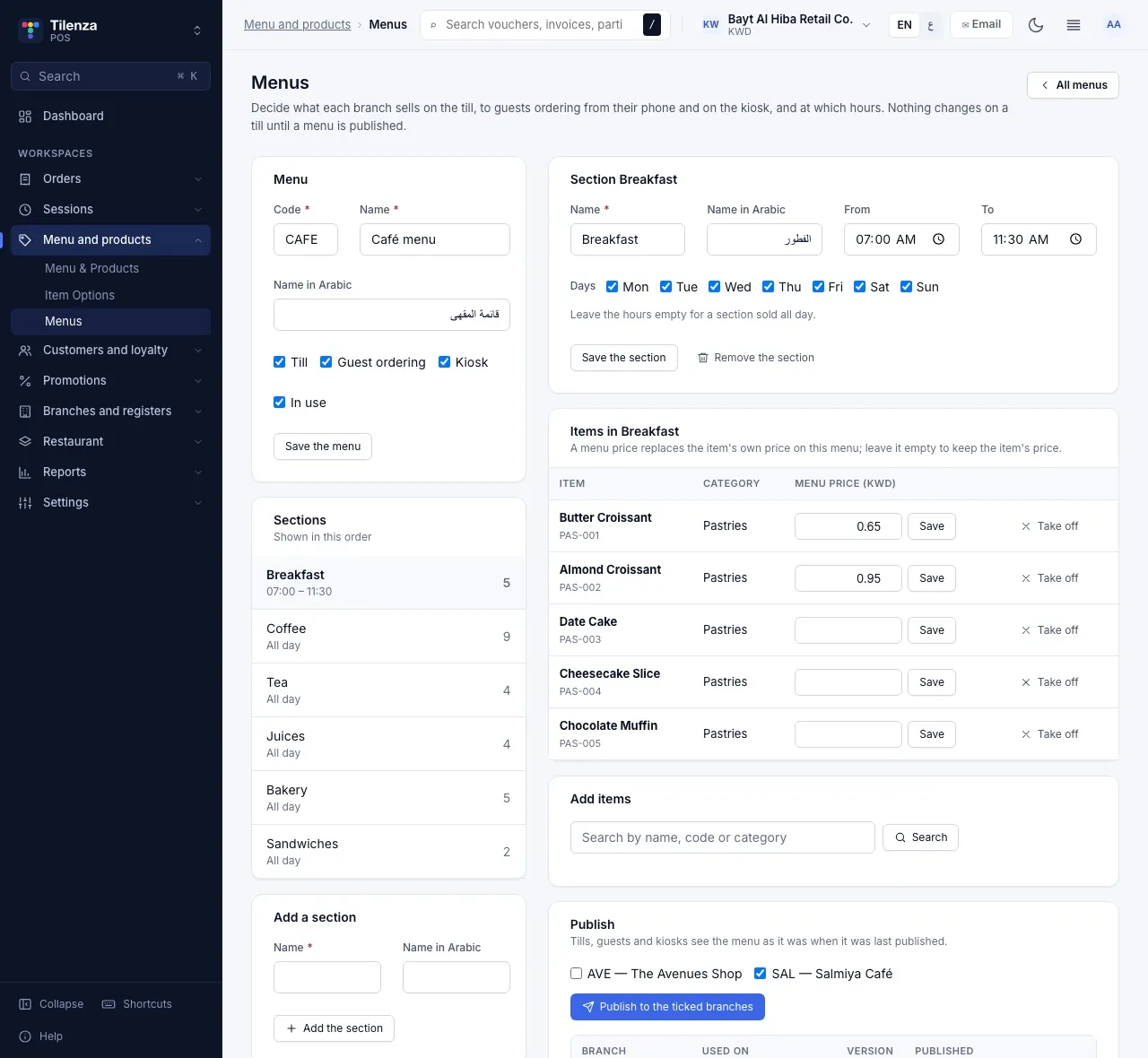
A menu decides what a branch sells on the till, to guests who order from their phone and on the kiosk, and at which hours. Without a menu every branch shows every item that can be sold.
Switch it on
Open Settings › POS Settings, tick Menus: choose what each branch sells, and at which hours and save. Menus then appears under Menu and products.
Build a menu
- Under Add a menu, give the menu a code and a name and tick where it is used: Till, Guest ordering, Kiosk.
- Add a section for each group the cashier should see as a tab, such as Breakfast or Coffee.
- Open a section and add items with Add items: search by name, code or category, then Add the ticked items.
- Give a section its hours and days when it is sold only part of the day. Leave the hours empty for a section sold all day.
- Type a Menu price when an item costs something else on this menu. Leave it empty to keep the item's own price.
An item can sit in two sections. When both are open it shows once, in the first.
Publish
Nothing changes on a till while you edit. Under Publish, tick the branches and press Publish to the ticked branches. The table below shows which version each branch runs.
A till picks the new version up at its next refresh or when it is reloaded. Guests and the kiosk see it at once.
A branch runs one menu on the till, one for guests and one on the kiosk. Publishing another menu to the same branch replaces the first one there.
Take a menu off
Take off in the table removes the menu from that branch, which then shows every item again. Remove the menu does the same for every branch.
Hours and time zone
The hours of a section follow the time zone shown on the first page of Menus. It comes from the country of the workspace and can be changed there.
Didn’t find what you need? Ask a person