Goods counted in pieces and priced by weight
Catch weight items keep the quantity and the real weight on every movement, and are bought and sold per weight unit.
For goods that are counted in one unit and bought and sold by weight: meat, fish, cheese, produce, metal, cable. No two pieces weigh the same, so every movement keeps both figures: how many, and what they really weighed.
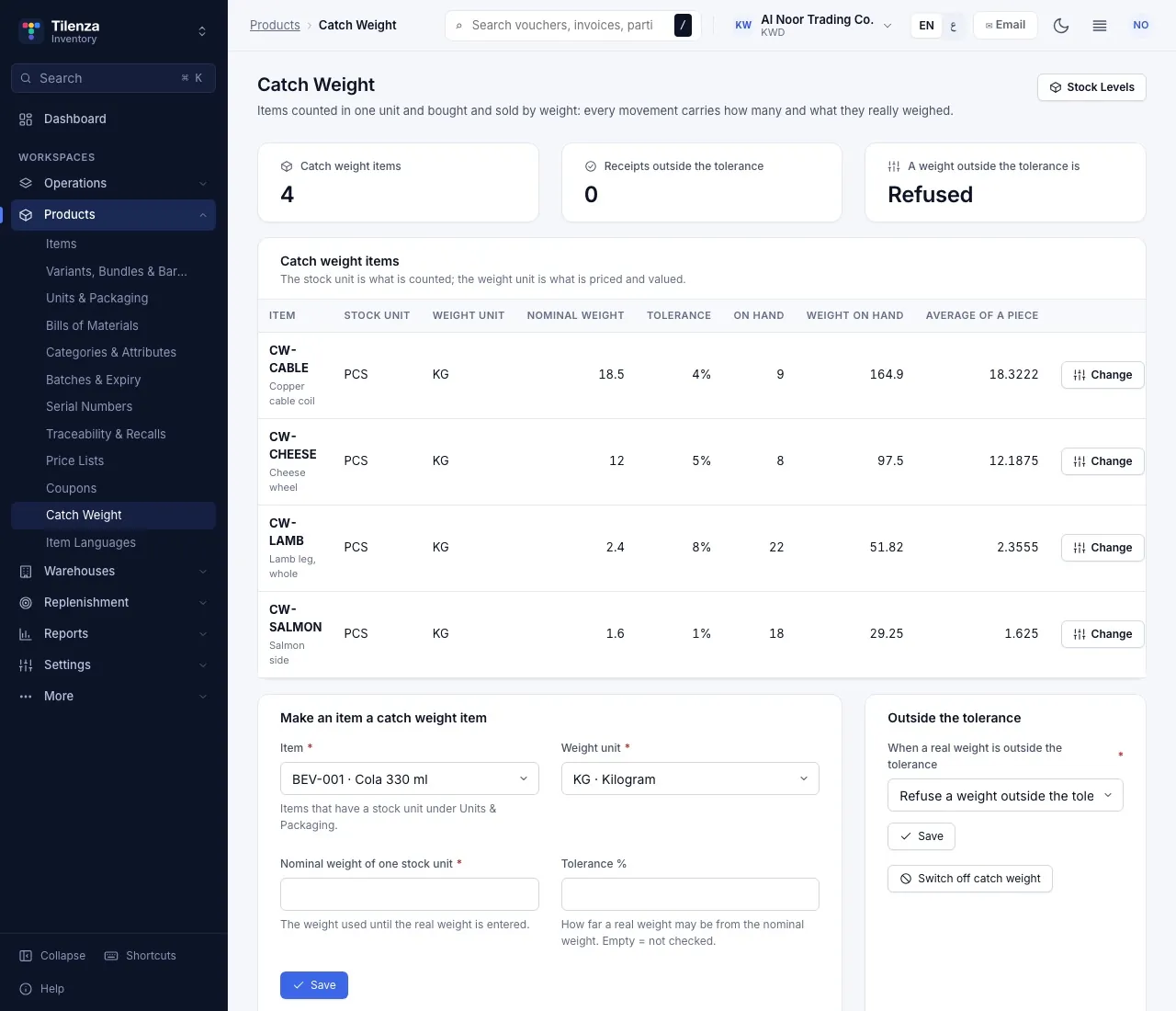
Switch it on
Open Products › Catch Weight and press Switch on catch weight. It needs stock control and Units & Packaging. Items you do not tick stay exactly as they are.
Tick an item
- Under Make an item a catch weight item, choose the item. It must have a stock unit under Units & Packaging, such as pieces or cases.
- Choose the Weight unit, for example KG.
- Type the Nominal weight of one stock unit: what one piece usually weighs. It is used until the real weight is entered.
- Type the Tolerance %: how far a real weight may be from the nominal weight. Leave it empty if you do not want a check.
- Press Save.
Change opens an item again. Stop catch weight for this item unticks it; the weights already recorded are kept.
Enter the real weight
With the switch on, these screens ask for the weight next to the quantity:
- Goods Receipts: the quantity is the weight received, and Pieces is how many came.
- Sales order: when you press Mark delivered, type the real weight of each line.
- Stock Transfers, Stock Adjustments and Scrap: type the real weight of the line.
- Stock Counts: type the counted weight beside the counted quantity.
- Purchase Returns and Customer Returns: type the weight that goes back or comes back.
A field you leave empty takes the nominal weight. A weight outside the tolerance is refused; under Outside the tolerance you can choose to accept it and have it flagged in the report instead.
Buy by weight
A purchase order line of a catch weight item is written in the weight unit: 25 KG at a price per KG. Receive the weight that really came and the number of pieces. The stock rises by the pieces, its cost is the weight times the price, and the bill is for the weight received.
Sell by weight
A sales order line stays in pieces, and its price is per weight unit. The order shows the total at the nominal weight. When the goods are delivered you type the real weight; the order total follows it, and the invoice carries the weight as its quantity.
Scale labels and the scanner
A scale label, or a barcode that carries a net weight, counts as one piece and fills the weight. The scanner adds up the weights it reads and sends them with the receipt, the count and the transfer.
See the stock and the reports
Stock Levels and the item's Stock tab show the weight under the quantity. A lot keeps its own weight, and so does each serial number.
On the Catch Weight screen:
- Stock in both units: pieces and weight on hand, and the average weight of a piece against nominal.
- Average weight of a piece: pieces and weight received and issued in a period.
- Weight against nominal by supplier: what each supplier delivered against the nominal weight, with the receipts outside the tolerance.
Didn’t find what you need? Ask a person