The pipeline: deals, stages and the board
A card for each deal, a column for each stage, and the reasons deals are won and lost.
A deal is a sale you are working on. The pipeline is the set of stages a deal passes through on its way to won or lost.
The pipeline is a part you switch on. If it is not in your menu, open Pipelines and stages and switch it on. A first pipeline with the usual stages is made for you, and nothing is asked of your team until you change it.
What it is for
- Everyone sees what is being sold, to whom, for how much and what happens next.
- The value of open deals, and the same value weighted by the chance of closing, tell you what to expect.
- The reasons deals are won and lost tell you what to change.
The board, the list and the calendar
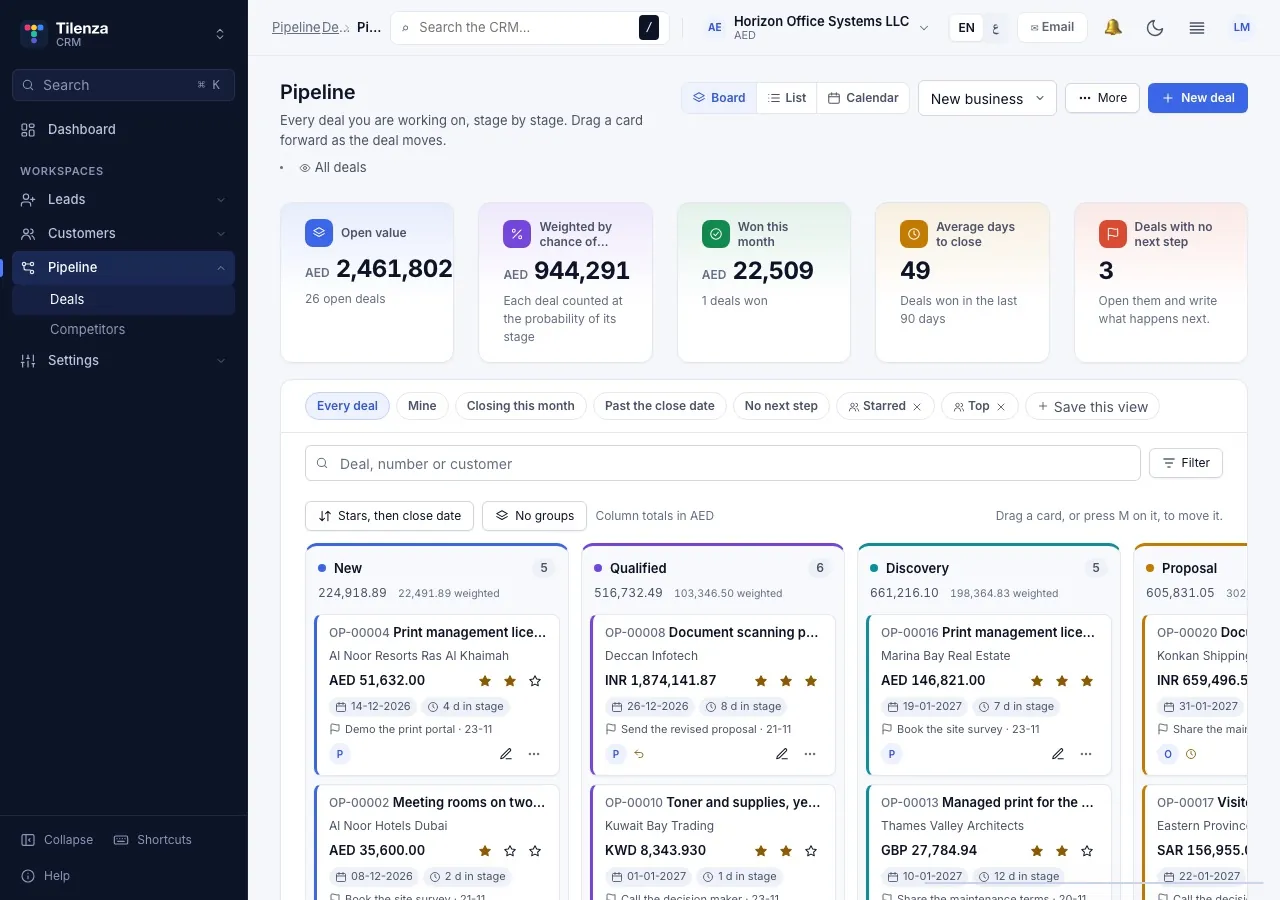
Open Pipeline. The board has a column for each stage and a card for each deal.
- Drag a card to another column as the deal moves. On a keyboard, press Space on a card, choose the column with the arrow keys and press Space again. Press M for a list of the columns the card can go to. On a phone the board shows one stage at a time and each card has a Move to menu.
- The head of each column shows how many deals it holds, their value in your own currency and the same value weighted by the probability of the stage. These figures count every deal in the column, not only the cards on screen.
- A card shows the number, the name, the customer, the amount in the currency of the deal, the close date, the days in the stage, the next step and the owner. A close date turns red when it has passed. A small flag tells you something needs attention; hover over it to read why.
- The pencil on a card changes the close date, the next step and the owner without leaving the board.
- Press List for the same deals as rows you can search, filter, sort, group and export. Press Calendar to see deals on the day they should close; drag one to another day to change the date.
- The figures above the board are the open value, the weighted value, what was won this month, the average days to close and the deals with no next step.
You see the deals you own. People allowed to see all deals see everyone's.
Opening a deal
Press New deal. A name, a customer and an amount are enough. You can choose a customer you already have or type the name of a new one. A deal can also be opened when a lead is converted, and from the Deals tab of a customer.
A deal can be in any currency. Its value in your own currency is worked out from the exchange rate kept in Finance and refreshed every night while the deal is open. If no rate is kept for a currency, type the rate on the deal.
The page of a deal
- Stage path. Click a stage to move the deal there. Won and Lost ask for the reason.
- Lines. Add products and services from your catalogue. The price comes from the price list of the customer, with quantity breaks where you have them, and the amount of the deal becomes the sum of its lines.
- People. Say who decides, who pays, who helps and who stands in the way.
- Competitors. Note who you are up against and their price, and read the battlecard for each.
- Plan. With plans switched on, list the steps on both sides until the signature and share them by a link. The customer ticks their own steps without signing in.
- Timeline. Every stage, change and approval, newest first.
Stages that ask for something
In Pipelines and stages each stage has a probability, a place in the forecast and, if you want, things a deal must have before it enters: an amount, a next step, a decision maker, at least one line, or items on a checklist. When a card is dragged without them, a panel names what is missing and lets you fill it in there and then.
A stage can also ask for approval. When an approval rule in Finance matches the deal, for example deals above an amount, the deal enters the stage and waits. The approver decides from the Finance approvals inbox or from the page of the deal, and the owner is told.
Stars
With stars switched on, a deal can carry one, two or three stars. Click a star on the card, the row or the page of the deal; click the highest lit star again to clear them.
- Stars put a deal first: cards in a column and rows in the list are ordered by stars, then by close date, then by amount. Each person can choose another order for the board, and it is remembered for each pipeline.
- Filter by stars on the board, the list and the calendar. Two views are shared with the team from the start: Starred, and Top for the open three-star deals by close date. The dashboard lists the top deals closing this month.
- When someone else changes the stars on your deal you get one notification.
- Stars are your team's own ranking. They change no figure, a closed deal keeps the stars it had, and the customer never sees them.
- The names of one, two and three stars are yours to change in Choice lists.
Deals that need attention
A deal is flagged when it has sat in its stage longer than the stage allows, when its close date has been pushed twice or more, when it has no next step or no decision maker, when nothing has happened for 14 days, or when it is much larger than usual. Each flag says exactly why. Deals with two or three stars are flagged for silence sooner.
Read next
- Leads: from the first enquiry to a customer
- Customers and the people who work there
- Forecasts
Didn’t find what you need? Ask a person