Customers and the people who work there
One record for each customer and one for each person, with everything the company knows about them on a single page.
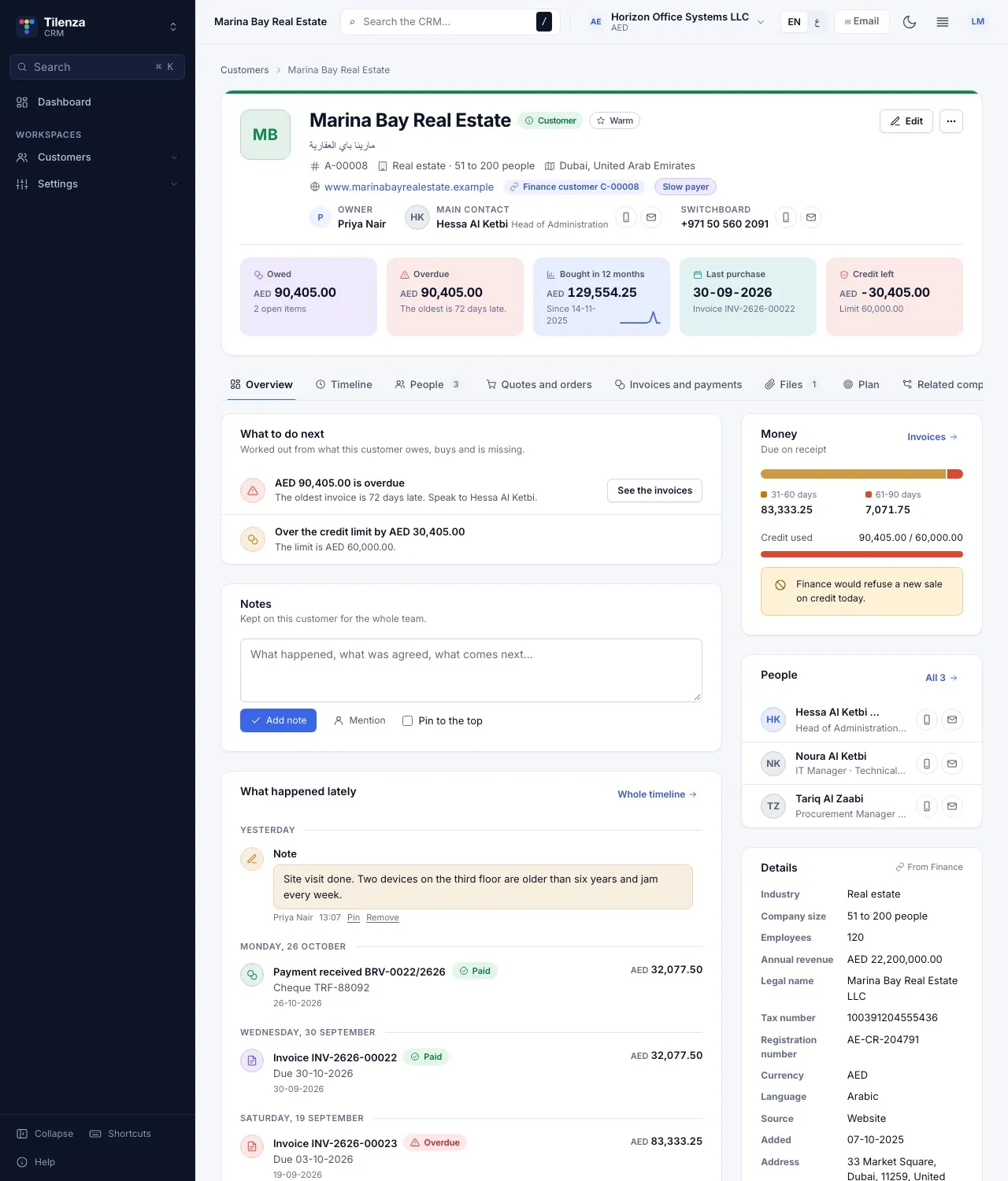
A customer is a company or a person you do business with. The CRM keeps one record for each customer and one for each person, and puts everything the company knows about them on a single page: the Customer 360.
What it is for
- One record for each customer, shared by every product. A customer that Finance invoices is the same record here; the till and the online shop point at it too. Nothing is copied.
- People are kept once. A person can belong to more than one customer, for example a consultant who works for two of them.
- A prospect stays a prospect. It becomes a customer in Finance, with its own account in the ledger, when you say so or at the step your workspace chose.
The customer list
Open Customers. The list has two tabs, Organisations and Individuals, and three ways to look at it: a list, by place, and as groups of parent companies with their branches.
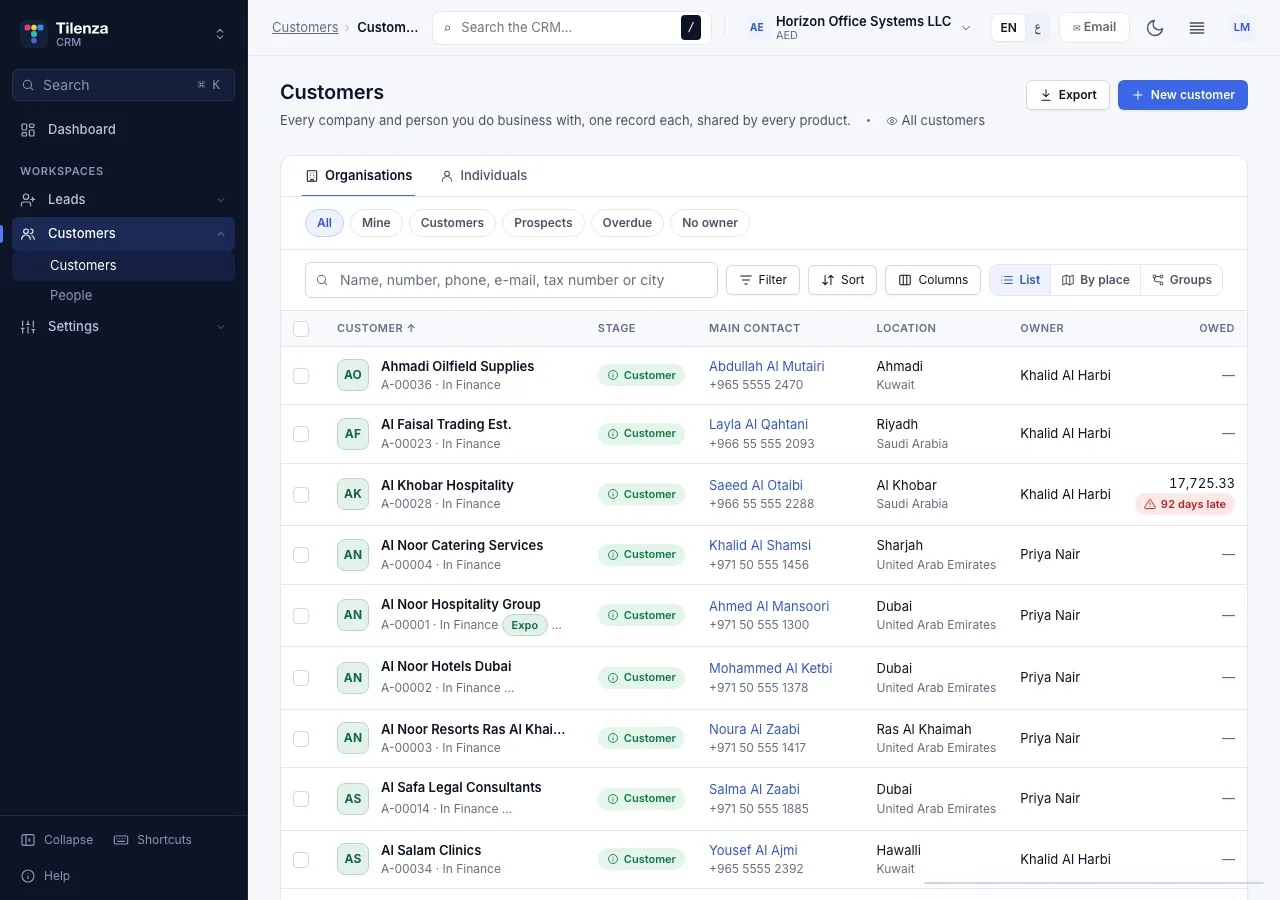
- Search by name, number, phone, e-mail, tax number or city.
- Filter by stage, owner, tag, country, city, industry and rating, by whether the customer is in Finance, and by overdue invoices.
- Save a set of filters as a view, for yourself or for everyone.
- Export the list to a spreadsheet, if you are allowed to export.
- You see the customers you own and those whose team you are on. People allowed to see all customers see everyone.
The Customer 360 page
Open a customer to see the whole relationship, read live from each product:
- At the top: the stage, the owner, the main contact with buttons to call and to write, and the tags.
- The figures: what they owe, what is overdue and for how long, the credit limit and what is left of it, the last purchase and the spend of the last twelve months. The balance is the same figure as the customer statement in Finance. People who are not allowed to see money do not see these figures.
- What to do next: a credit hold, overdue invoices, a broken promise to pay, a change waiting for approval, a missing owner or contact, a customer who has not bought for a long time.
- The timeline: invoices, credit notes, receipts, orders, till sales, shop orders, freight jobs, notes, files and changes, newest first. Filter it by kind and load older entries at the bottom.
- The tabs: People, Quotes and orders, Invoices and payments, Purchases, Freight jobs, Files, Plan and Related companies.
Write a note under the timeline. Type @ and a name to mention a colleague; they get a notification. Pin a note to keep it at the top.
Changing a customer
Press Edit. Fields that Finance controls, such as the legal name, the tax number, the address and the currency, are saved in Finance through the Finance checks. Where your workspace asks a second person to approve such a change, the page shows it as waiting until it is approved.
A phone number is kept in its international form: write it with the country code, or as a local mobile number of the customer's country. A tax number is checked for the countries where its format is known.
From prospect to customer
On a prospect, press Make customer. The CRM first looks for a Finance customer with the same tax number or name and offers to link to it, so nobody is entered twice. Otherwise it creates the Finance customer with its code and links the two.
In CRM Settings you choose the step at which this will happen by itself: a quotation sent, a deal won, an order confirmed, the first invoice raised, or only by hand. Quotations and deals arrive with the next parts of the CRM; until then a prospect becomes a customer by hand.
People
Open People for everyone who works at your customers. On a customer, the People tab shows them as a list or as a chart of who reports to whom, with the role each one plays. A person added here is also a contact of the customer in Finance, and the other way round.
Groups, teams and plans
- Parent company: set a parent on a customer. The parent shows the balance, the overdue amount and the spend of the whole group.
- Related companies: other links between companies, such as partner, supplier or competitor.
- Account team: colleagues who work on the customer with you, each allowed to read or to edit.
- Plan: goals for the customer with a target and a date, and a list of the product categories that similar customers buy and this one never bought.
Individuals from the till and the shop
A person who buys at the till or in the online shop is an individual customer with their purchases, loyalty points and store credit. Bring the existing ones in once from CRM Settings, or open one from its page in Point of Sale.
Get ready
- Open Choice lists and review Industries, Company sizes, Customer ratings and Roles of people.
- Set the country in CRM Settings, so local phone numbers are read the right way.
- Read Leads to see how a new enquiry becomes a customer.
Didn’t find what you need? Ask a person