Read the Sales dashboard
Order value, open orders and what is waiting in the warehouse, on one screen.
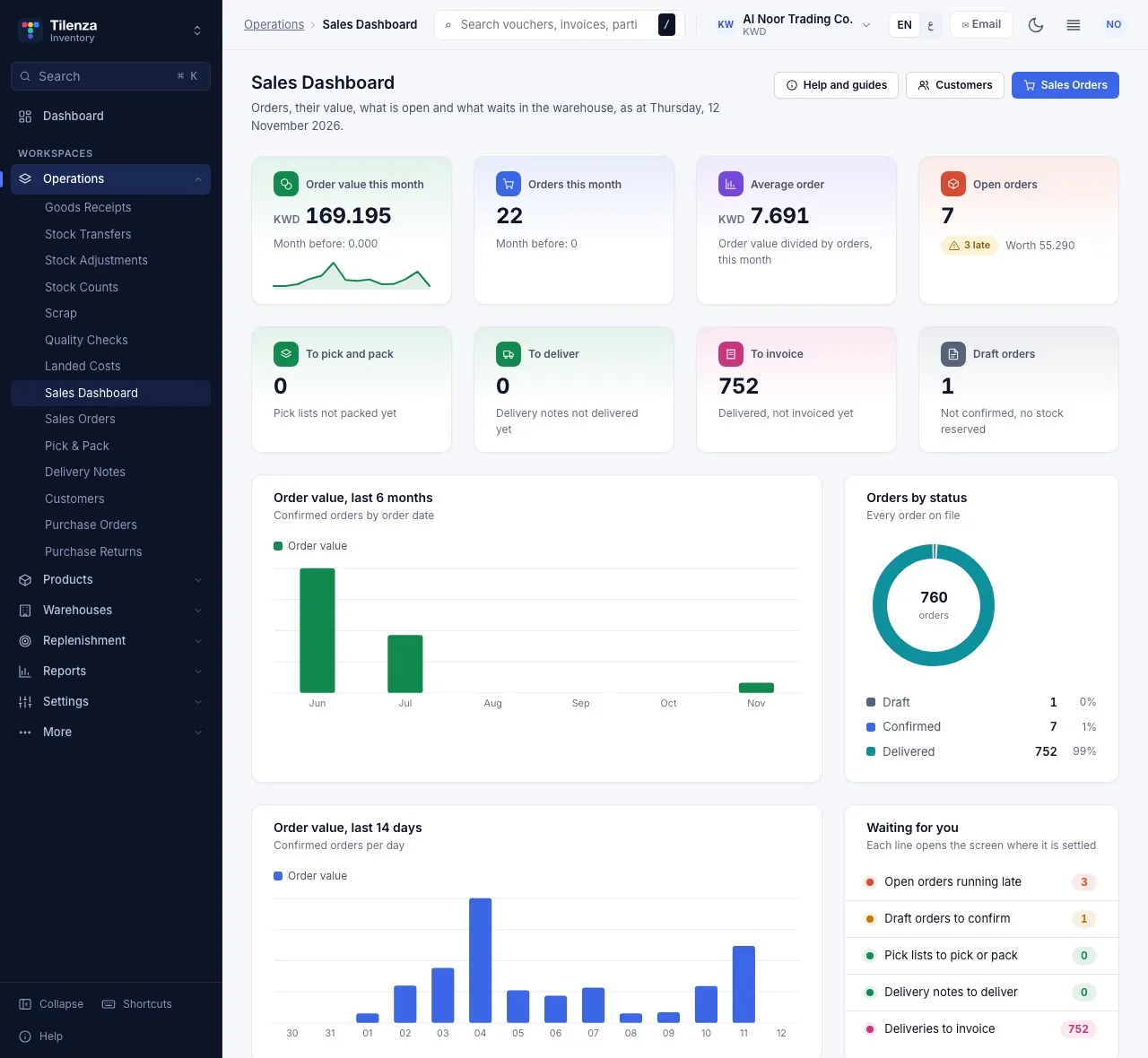
The Sales dashboard answers three questions on one screen: how much was ordered, what is still open, and what is waiting in the warehouse.
The figures at the top
- Order value this month and Orders this month count confirmed orders by their order date, and compare them with the whole month before.
- Open orders are confirmed orders not fully delivered yet. A warning shows how many are past their promised date.
- To pick and pack, To deliver and To invoice follow an order through the warehouse: pick lists not packed, delivery notes not delivered, and deliveries without an invoice.
- Draft orders are saved but not confirmed, so they reserve no stock.
Each figure opens the list behind it.
The charts
Order value, last 6 months shows the trend month by month. Order value, last 14 days shows the days. Orders by status shows how all orders are split between draft, confirmed, delivered and invoiced.
Waiting for you
The list on the right counts what needs action now. A green dot means nothing is waiting on that line. Click a line to open the screen where it is settled.
Customers, items and the latest orders
Top customers and Top items rank the last 90 days by order value. Latest orders lists the newest orders with their customer, date, status and total.
Didn’t find what you need? Ask a person